
Arc Raiders adds backpack light toggle in latest update
 James Whitfield
1 min read
James Whitfield
1 min read

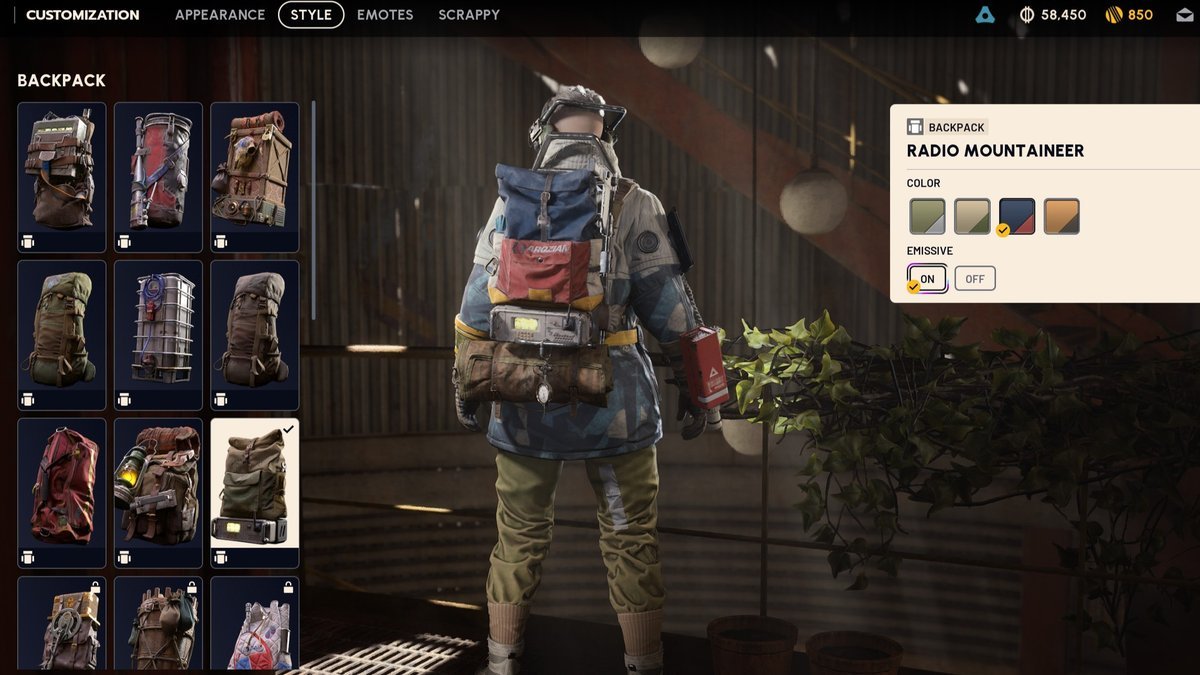
Arc Raiders has introduced a new feature allowing players to disable the light emitted by their backpacks, addressing a long-standing community request. The Frozen Trail 2.0 update includes this cosmetic option alongside various other tweaks and improvements to the game.
The backpack light can be toggled off through the game's customization menu. Players should navigate to the Raider menu, then select Customization from the bottom left corner. From there, access the Style menu at the top of the screen, choose Backpack from the left sidebar, and locate the Emissive toggle. Switching this option to off will disable the backpack's light.
The visual effect of this toggle is immediately apparent when adjusting the setting—the light will vanish and reappear as players toggle the Emissive option on and off. The exact location of the light varies depending on which backpack cosmetic is equipped, so players may notice different results across their collection.
This feature offers practical gameplay benefits. Disabling the backpack light can provide a tactical advantage by making players less conspicuous during stealth-focused moments. However, turning off the light may make characters harder to see in the game's darker environments, so players will need to weigh the trade-offs depending on their playstyle and current mission objectives.