
Steam’s Big Art Mode transforms living room gaming
 James Whitfield
2 min read
James Whitfield
2 min read

Steam has rolled out a visual redesign for Big Picture Mode called Big Art Mode, which emphasizes game artwork and offers a more appealing interface for living room setups.
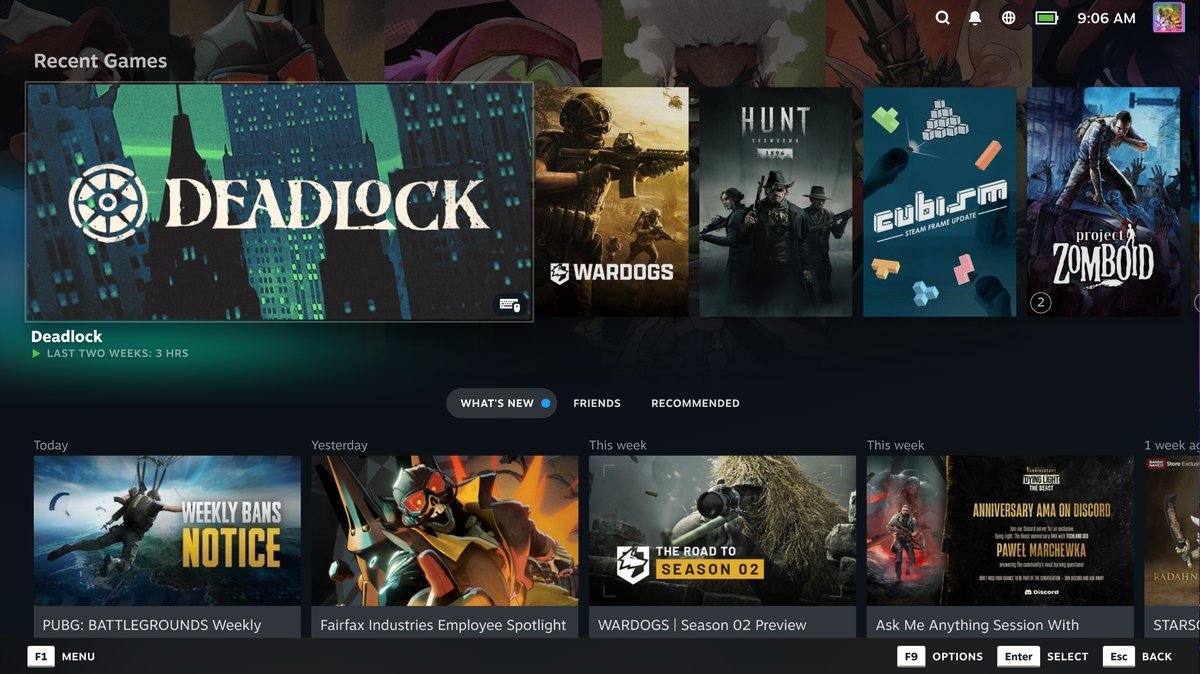
The new mode is now available in the latest Steam client release. Users can enable it by navigating to Settings and then Home within Big Picture Mode. The feature displays a large, full-screen version of a game's key art as the background, creating a more visually striking presentation than the standard interface.
The update has also been included in recent Steam Deck release notes, indicating broader adoption across Valve's gaming platforms. Big Picture Mode itself has long served as an alternative interface designed for television displays and controller-based gaming, offering a simplified menu system that minimizes keyboard and mouse interaction.
For users running a PC connected to a living room television, Big Art Mode represents a meaningful improvement to the experience. The interface prioritizes large visuals while reducing on-screen UI elements, creating a more cinematic feel when browsing a game library. On larger displays like OLED televisions, the enhanced artwork presentation becomes particularly noticeable, transforming the interface into something that feels more polished and intentional.
The redesign aligns well with how many users interact with their gaming PCs in living room environments. Rather than requiring keyboard input or traditional desktop navigation, Big Picture Mode lets players use a controller to access their library and launch games with minimal friction. With Big Art Mode's emphasis on visual presentation, the experience becomes more streamlined and aesthetically pleasing, making it feel less like using a computer and more like using a dedicated gaming console.